

Who this local SEO checklist is for
Start with your phone, not some dashboard. Walk into your service area, search for the job you actually want to book, and see where you show up across Google’s four spots: paid ads, the map pack, organic results, and AI answers. As Google Business Profile Help notes, local results are mainly based on relevance, distance, and popularity, so the same search two towns over produces a different mix, and one search from the office tells you almost nothing. Stick with Google for this check. It’s where homeowners start, and it’s the only place all four result types fight for attention on one screen. This fits if you run an established home service outfit with crews covering a few towns from one office: HVAC, plumbing, roofing, remodeling, drywall. An ownership or eligibility screw-up undoes everything else you fix, so start at number one and go in order.
1. Check whether your Google Business Profile is eligible and accurate
Your profile works when every field matches the real business. It fails the moment a field was stuffed to grab searches.
- Business model and eligibility. Google supports four setups: a storefront customers visit, a service-area business with the address hidden, a hybrid doing both, and a location inside another business. More than one staffed office is not a fifth type. Each real location gets its own verified profile and its own page on the site, with its own address, phone, hours, and staff. Pass: the profile matches one of those setups, and the address is hidden if customers never come there. Fail: a mailbox, a virtual office, or a coworking desk is listed as a customer-facing address, or two profiles cover one central operation. On a fail, switch to a service-area setup with the address hidden before you touch anything else. Service-area profiles also get filtered against each other for overlap, so two listings covering the same towns end up competing for the same spot.
- Profile inventory and ownership. Pass: one verified profile controlled by an account the owner can log into, with named managers. Fail: an old agency, a former partner, or an ex-office manager still holds primary ownership, or a second listing exists under an old name or an old number. On a fail, search Maps by hand for the previous phone number, previous address, and every abbreviation of the business name. Then claim or request removal of the extras.
- Categories. Pass: the primary category names the trade the way a customer would say it, and each secondary category reflects work your techs can actually handle. Fail: a vague pick like “contractor” when a specific category exists, or a pile of categories chosen to catch unrelated searches. According to Moz’s Local Search Ranking Factors guide, businesses are allowed to select up to ten categories when creating a Google Business Profile, which is a ceiling, not a target. On a fail, set the primary to the specific trade and delete the categories you can’t staff.
- Name, phone, website, and hours. Pass: the name on the profile matches the name on the truck, the phone rings at the office, and the website link goes to a live page about that service. Fail: a city or service keyword tacked onto the business name, a tracking number sitting in the main phone field, or hours saying 24/7 when nobody picks up after six. On a fail, restore the real name and number, and set hours to the ones when a caller gets a human.
- Service catalog, posts, and Q&A. Pass: repair, replacement, installation, inspection, and maintenance are listed as separate services with plain descriptions. A post goes up at least monthly, tied to a real job or the season. Every question in the Q&A tab has an answer from the business, including the common ones you post and answer yourself. Fail: two generic entries, services you quietly stopped offering two years ago, no post in a year, or a question about hours or pricing answered by a stranger. On a fail, match the service list to what you dispatch most often. Then write four posts for the next four weeks and answer every open question today.
- Service area against dispatch reality. Pass: the listed cities match your travel policy, licensing, and technician coverage. Fail: twenty towns listed because somebody thought it would widen the map. Google Business Profile reports that google says service businesses can define service areas and specialties even without a physical storefront, but a wide area describes coverage and does not shorten distance. On a fail, trim the list to the towns a truck reaches in roughly 30 minutes.
2. Check whether your website proves the company serves the right jobs and places
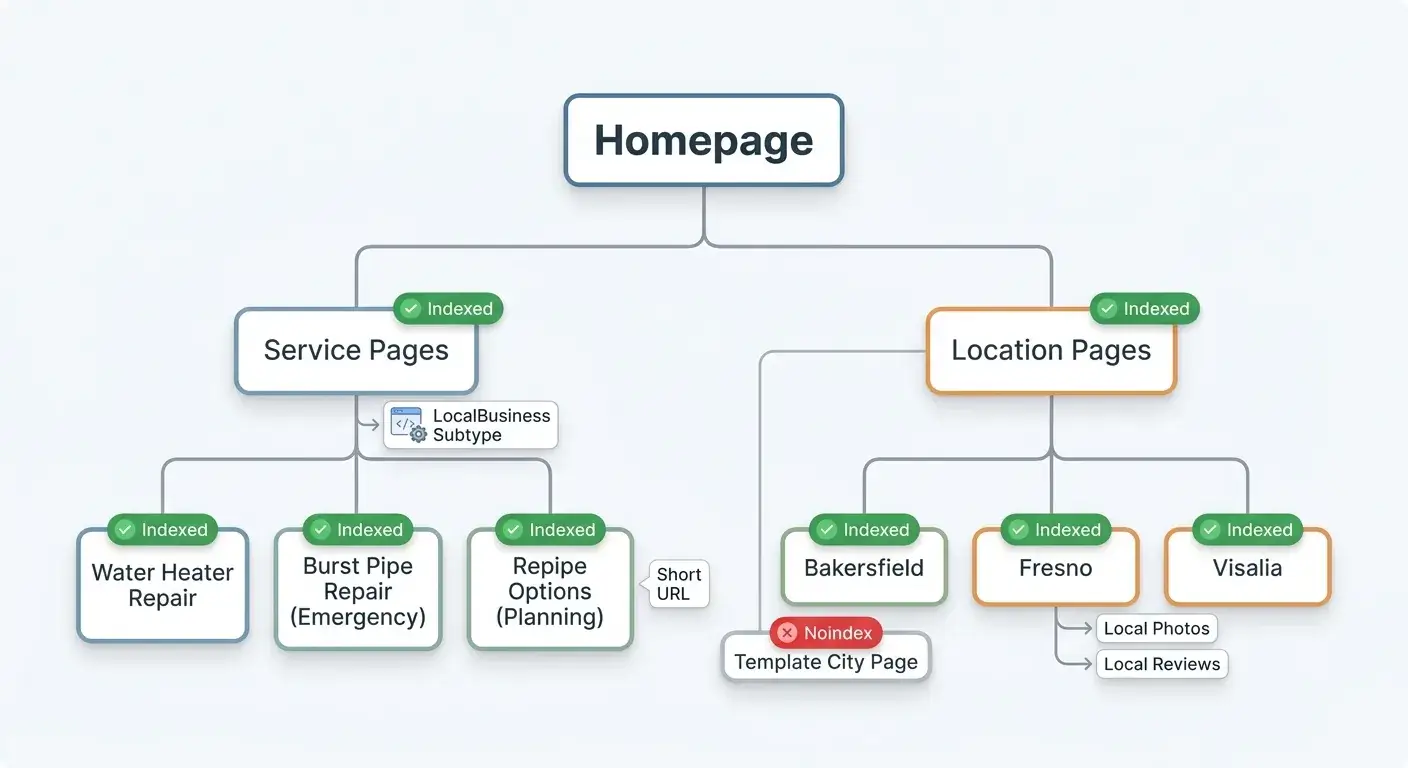
Listing twenty towns won’t rank you in twenty towns. Build a city page only where you genuinely dispatch and only where you can write about real jobs, travel times, permit or inspection notes, local building stock, and a customer story. That usually means about ten pages, not forty cloned ones. Pick the words for those pages from two free sources: the Search Console performance report filtered to the queries you already get impressions for, and Google autocomplete plus the related searches at the bottom of the results page for your trade and your town. Write for the phrasing a homeowner uses, like “water heater leaking from the bottom”, not the phrasing a wholesaler uses.
- Service architecture. Pass: every service with real revenue behind it has its own page covering symptoms, scope, process, what you won’t take on, and one clear way to call or book. Fail: a single services page that lists twelve trades in bullet points. On a fail, split the highest-ticket service out first and write the page the way you’d explain the job standing in a driveway.
- Emergency intent separated from planning intent. Pass: “burst pipe repair” and “repipe options” live on different pages. People typing them are in different moods. Fail: one page tries to serve both and converts neither. On a fail, split the page and put the phone number at the top of the emergency version.
- Local proof on location pages. Pass: each page carries photos from that market, named neighborhoods you actually cover, response-time expectations, and reviews from those customers. Fail: the page is a template with the city name swapped. Google’s spam policies treat pages built mainly to funnel visitors from related searches into a final destination. On a fail, delete the thin pages and rebuild the three towns that bill the most.
- On-page signals, images, and URLs. Pass: title tags, headings, and copy name the service and the market once, in a sentence a human would say. Photos are your own, saved with a descriptive file name, compressed under about 200 KB, and given alt text that describes the work. URLs are short and readable, like /water-heater-repair/ rather than /services/page-id-4471. Fail: a city list stuffed into the footer, a title promising a service you don’t sell in that market, or a gallery of IMG_8842.jpg files that takes six seconds to load on a phone. On a fail, rewrite the title and the first paragraph, then fix the image names, alt text, and file sizes on that page.
- Structured data and crawlability. Pass: a LocalBusiness subtype such as Plumber, HVACBusiness, or RoofingContractor, with name, phone, hours, and service area matching the profile, validated in the Rich Results Test against the rendered page. An XML sitemap submitted in Search Console, old URLs 301 redirected to their replacements, and Core Web Vitals green on mobile. Fail: schema marking up a branch you don’t have, service pages that are noindexed, orphaned, or only visible after JavaScript loads, or a coverage report full of pages crawled and not indexed. On a fail, fix access and indexation before you write one more word of content.
3. Check reviews, citations, and local authority signals
The citations that matter most define your business as an entity: Google, Apple Business Connect, Bing Places, Facebook, Yelp, the BBB, your chamber, your trade association directory, and your manufacturer or supplier dealer locators. Claim each one yourself, use the same name, number, hours, and categories, and finish the phone or postcard verification where it’s asked for. Angi, HomeAdvisor, and Thumbtack pass as citations, but you buy them for leads. That’s a cost-per-booked-job decision made separately from ranking.
- Review benchmark against the local top three. Open the map pack for your money search, write down each competitor’s total review count, then count how many each one earned in the last 90 days. Pass: you’re inside the median total and matching or beating the 90-day pace. Fail: a competitor is adding ten a month while you add one. On a fail, build a request routine: a review link texted by the tech before he leaves the driveway, a QR code on the invoice and inside the truck, and one office follow-up the next morning. Volume alone doesn’t move you, and Google says there’s no way to request or pay for a better local ranking.
- Authenticity. Pass: reviews name the actual job, the tech, and the town. Fail: five reviews in one afternoon, all four words long, all from accounts with no other activity. On a fail, shut off whoever is producing them and go back to asking real customers one job at a time.
- Response coverage. Pass: every review answered, negatives answered factually with no address, no invoice detail, and no customer name the reviewer didn’t use themselves. Fail: negatives sitting unanswered for weeks, or a reply that argues the invoice in public. On a fail, answer the oldest negative first in three sentences and move the detail to a phone call.
- Complaint themes. Pass: no repeated complaint about the same tech, the same callback, or the same unreturned call. Fail: three reviews in a row mentioning nobody called back. On a fail, fix dispatch and phone coverage first. An operations problem outruns any amount of local SEO work.
- NAP accuracy across the footprint. Pass: name, address, phone, URL, and hours match everywhere, including old suite numbers and closed branches. Fail: the previous phone number still returns live listings. On a fail, correct the large data aggregators and the directories that appear in your branded search results, then recheck quarterly.
- Real-world authority. Pass: links and mentions from suppliers, local news, sponsored teams, chambers, and trade groups. Fail: a few hundred directory submissions and nothing a customer would recognize. On a fail, pick three real relationships this quarter: a supplier dealer page, a team or event sponsorship, and one trade association listing.
If a run through these items turns up more red ink than you have evenings to fix, a short conversation about what to repair first costs you nothing and usually saves a quarter of wasted effort.
4. Check whether your tracking proves rankings turned into jobs
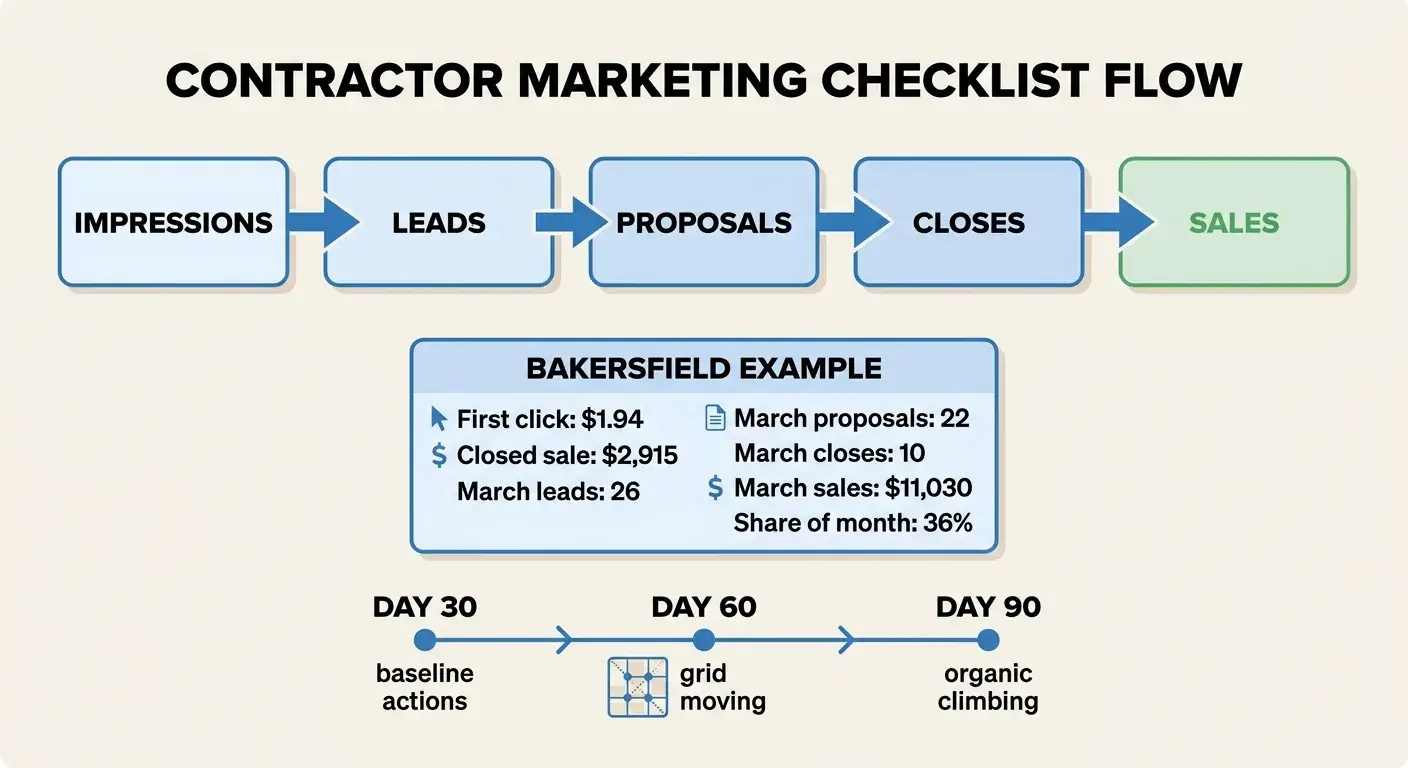
Track the chain, not the ranking: impression, call or form, answered conversation, booked appointment, completed job, revenue. Set the plumbing first. Google Search Console verified on the live property with the sitemap submitted, Google Analytics firing on every page with calls and form submissions set as conversions, a call tracking number in the website header with dynamic insertion while the primary business number stays in every citation and on the profile, and UTM parameters on the Google Business Profile website link so map traffic separates from organic. Then reconcile the lead list against your dispatch software every month.
- Answer rate. Pass: you know what percentage of inbound calls were answered live last month, by hour. Fail: nobody has the number. On a fail, pull the carrier log this week. Ranking in the map pack while calls roll to voicemail after five is the most expensive failure on this list.
- Attribution integrity. Pass: every form goes to a monitored inbox with an owner, and booked jobs carry a source field. Fail: the form sends to an address nobody has opened since the website launched. On a fail, send a test form, name an owner, and add the source field to the job record.
- Rank measurement by location. Pass: rankings are measured on a grid across the service area. Distance changes what a customer sees. Fail: one report, run from the office, shown to the owner as the whole territory. On a fail, set up a grid that covers the towns you dispatch to.
- Revenue reconciliation. Pass: last month’s Google-sourced leads tie to proposals, closes, and dollars. Fail: the report stops at clicks. On a fail, match last month’s leads to invoices by hand once with your office manager, then automate it.
Ranking in the map pack with no calls. Work the three causes in order. Visibility: if profile impressions are high but calls, website taps, and direction requests are near zero, you’re showing for searches that don’t buy or sitting at the edge of the pack. Trust: a 3.6 star average, no photos from this year, or negative reviews nobody answered sends the tap to the listing beside you. The tell is steady impressions with flat actions. Lead handling: the calls are arriving and nothing’s being booked, which shows up as an answer rate under 90 percent, voicemails nobody returns, or a form inbox with no owner. Fix in that order. A booking problem gets worse the moment you add traffic.
A drywall company in Bakersfield paid $1.94 for their first click after rebuilding their ads in February 2026. That lead closed the next day for $2,915. March brought 26 leads, 22 proposals, 10 closes, and $11,030 in sales from Google ads and organic, over 36 percent of the month’s sales.
Timing by surface, ranges and not promises:
- Google Search Ads: first calls in week one.
- Map pack: movement in 30 to 60 days.
- Organic results: 3 to 6 months.
- AI answers: no promised date.
What to watch on the way there:
- Day 30: profile impressions and searches up, map actions (calls, website taps, direction requests) logged as a baseline, answer rate measured by hour.
- Day 60: map actions and calls up on the items you fixed, the grid moving in your core towns, first bookings tagged by source. A flat grid at day 60 usually points to a duplicate or an eligibility problem rather than slow progress.
- Day 90: organic impressions on service pages climbing in Search Console, and booked jobs and revenue tied to source for two months running.
Print or save: all 21 checks
| # | Check | Pass signal | Fail signal |
|---|---|---|---|
| 1 | Model and eligibility | Correct setup, address hidden if no visits | Mailbox, virtual office, or coworking desk |
| 2 | Profile inventory and ownership | One verified profile, owner holds the login | Old agency owns it, or a duplicate is live |
| 3 | Categories | Specific primary, real secondaries | “Contractor”, or categories you can’t staff |
| 4 | Name, phone, website, hours | Matches the truck, the office, a live page | Keywords in the name, fake 24/7 hours |
| 5 | Services, posts, Q&A | Services listed separately, questions answered | Two generic entries, no post in a year |
| 6 | Service area | Matches dispatch, licensing, travel | Twenty towns listed for reach |
| 7 | Service architecture | A page per revenue service | One services page for twelve trades |
| 8 | Emergency vs planning intent | Separate pages | One page serving both, converting neither |
| 9 | Local proof on location pages | Local photos, neighborhoods, local reviews | Template with the city name swapped |
| 10 | On-page, images, URLs | Named once, named image files, short URLs | Footer city lists, IMG_8842.jpg |
| 11 | Schema and crawlability | Right subtype, validated, indexed | Noindexed or orphaned service pages |
| 12 | Review benchmark | Inside the local median and 90-day pace | One a month against a competitor’s ten |
| 13 | Authenticity | Reviews name the job, the tech, the town | Five four-word reviews in one afternoon |
| 14 | Response coverage | Every review answered, no private detail | Negatives sitting unanswered for weeks |
| 15 | Complaint themes | No repeated complaint | Three reviews about no callback |
| 16 | NAP accuracy | Name, number, hours match everywhere | Old phone number still returns listings |
| 17 | Real-world authority | Supplier, chamber, trade, local news links | Bulk directory submissions only |
| 18 | Answer rate | Known by hour for last month | Nobody has the number |
| 19 | Attribution integrity | Monitored inbox, source field on jobs | Form goes to an inbox nobody opens |
| 20 | Rank measurement | Grid across the service area | One report run from the office |
| 21 | Revenue reconciliation | Leads tie to proposals, closes, dollars | The report stops at clicks |
Red flags that stop the job
Each one can cost you the listing, the calls, or the trust that makes the rest work.
- An ineligible address. Suspension risk, and reinstatement takes paperwork you’ll wish you had filed in advance.
- Fake, bought, incentivized, or gated reviews. Reviews from employees and family, discounts in exchange for five stars, software that routes unhappy customers away from Google, or the same review text copied across profiles. All of it violates review policy and can take a profile down.
- Duplicate or hijacked profiles. Two listings split your reviews, your photos, and your calls, and one of them may be ringing a phone nobody owns anymore.
- A tracking number that replaced the primary number. The real number is gone from the citations, so consistency and attribution break at the same time.
- Location pages claiming work you can’t support. Pages for towns you don’t dispatch to, licenses you don’t hold, or response times you can’t hit.
What to do with the results
You can do local SEO yourself if you have an office person with four or five hours a week and the discipline to keep going in July when the phone is already ringing. Sort what you found into three piles.
Fix it internally when the fails are profile-level: categories, hours, services, duplicate listings, photos, review requests. These are the fastest wins and they need nobody’s permission.
Rebuild the foundation before spending another dollar when service pages are thin, pages aren’t indexed, or calls go unanswered. Traffic sent to a site that can’t convert is spend with no scoreboard behind it.
Hire help when the fails are structural and recurring: a grid that won’t move, a suspension, attribution that never ties to revenue. Sure Shot Systems runs this work in order and sends a weekly written report covering what shipped, results, next bets and Search Share. Every plan is month to month with no setup fee, ad spend paid directly and never marked up, and the client owns every account.
If the deeper problem is your trade’s specific lead mix rather than your profile, the channel-by-channel answers live in “how to get more roofing leads”, “plumbing marketing ideas”, and “hvac marketing ideas”.
Tell us what the inspection turned up and get a straight answer on what to fix first.
Frequently Asked Questions
What is the 80/20 rule in SEO?
It means a small group of checks carries most of the result. For a home service company that group is an eligible address, the right primary category, one real page per high-ticket service, genuine reviews at the pace your local top three are setting, and calls answered live. Those are items 1, 3, 7, 12 and 18 above, and the rest of the list mostly protects them. Posting schedules, directory volume, and schema tweaks sit in the other 80 percent of the effort.
Why did my listing stop ranking after I changed the business name, category, address, or phone number?
Material edits can push a profile back into review, and a filtered or suspended listing disappears from the map pack until it clears. Expect a disruption window of a few days to a few weeks. Before any future change, save screenshots of the current profile, keep utility bills or a lease ready for re-verification, and edit one field at a time so you know which change caused the problem.
What should I do if my Google Business Profile gets suspended?
Don’t create a new profile. A second listing makes reinstatement harder. Read the suspension notice to see whether it’s a soft suspension, where the listing is unverified but still live, or a hard suspension, where it’s gone from Maps. Then gather proof that the business is real at that address: a lease or utility bill, business license, insurance certificate, signage and vehicle photos, and file one appeal with all of it attached. Fix the underlying problem first, or the appeal fails twice.
Do Google Business Profile posts, geotagged photos, and service descriptions really improve local SEO ranking?
Treat them as unequal. Geotagging photos has never been shown to move position. Test one change at a time against your map grid and your call log rather than running them all at once.
Are Local Services Ads part of local SEO?
No. Local Services Ads are a separate paid product that sits above the map pack and requires license, insurance, and background checks before the Google Guaranteed badge appears. They’re billed per lead rather than per click, so they’re a paid channel with their own budget. Passing that screening doesn’t change your organic or map pack position, so the checklist items above remain the work that moves unpaid placement.
What would a marketing agency do that I can’t do myself?
Mostly cadence and measurement. An owner can fix a profile in an afternoon, but few can run a weekly grid, reconcile leads to invoices, rebuild service pages, and keep review velocity steady through a busy season. Before you sign, ask for a weekly written report and the ability to cancel month to month.
Researched and written with Sure Shot Cited, the AI article writer we built for our own client work, then reviewed by Ben Desjardins before it went live.