


Quick answer: what it takes to show up in ChatGPT search
Getting your company named in ChatGPT search takes three things: pages a search crawler can actually read, business information that says the same thing everywhere it appears, and real proof from sources outside your own website. No submission form, no listing fee and no paid placement. Most of the local SEO you already pay for carries over here, with one difference: an answer engine picks one or two companies to name instead of listing ten links, so “GEO vs SEO for Home Services: What Actually Carries Over” is worth reading for the full split. Expect the technical part to take an afternoon and the identity and content work to take 30 to 90 days before prompts start returning your name.
The single factor that decides the outcome: whether an AI system can identify your business, reach the page that describes the job, and trust what that page says.

Before you start: check whether your business is eligible to be found
Any public website a crawler can reach is eligible. When someone asks for a contractor nearby, ChatGPT does not answer from training data alone. It runs live web searches, often splitting one question into several queries, and reads the pages as they stand today. Gather these first:
- Access to your
robots.txtfile and to whatever sits in front of your site: a CDN, a firewall, a bot-protection service. - Admin access to Google Business Profile, Bing Places and Apple Business Connect.
- One page per core service you actually sell, with the phone number visible in text.
- Your license number, insurance carrier and certifications, published somewhere public.
- A current review profile with dates you can point to.
- Your real service area, town by town, with any travel or minimum-job limits.
This method fits a service-area business with a base of operations and a defined territory. Google points service-area businesses to one profile for the central office or base location with a designated service area, generally no more than about two hours’ driving time from that base. It does not fit you while your site sits behind a login, your pages render nothing in HTML, or your Google Business Profile is suspended. None of this visibility is for sale, so nobody can bill you for a spot in an answer.
Worth noting on crawler access: allowing a search crawler does not mean opening your whole site. Keep your customer portal, scheduling backend and staging environment behind a disallow rule or a login. What stays public is what a homeowner wants: services, service area, contact, hours, emergency availability, credentials and your booking path.
Step 1: Make sure ChatGPT can crawl the pages you want it to use
Start by confirming OAI-SearchBot can reach your public pages. That is the crawler OpenAI uses to surface websites in ChatGPT search, and a site with strong Google rankings can still be invisible if a blanket rule shuts it out.
- Open
yourdomain.com/robots.txt. If you seeUser-agent: *followed byDisallow: /, add an explicitUser-agent: OAI-SearchBotblock withAllow: /for the public sections. OAI-SearchBot and GPTBot are separate crawlers, so a rule for one does not cover the other. - Check the layer above your site. CDN and bot-protection rules block more crawlers than
robots.txtdoes, and they do it silently. Allow requests from OpenAI’s published IP ranges. - View the rendered HTML of a service page. If the phone number, service list and town names only appear inside a slider or script, a crawler may never see them.
- Read your server logs for OAI-SearchBot requests and the status codes they got back. A 403 means something in front of your site refused the request, a 404 means a broken link, a 503 means the server was too slow.
- Confirm no
noindextag survived your last redesign. That is the quietest failure point on this list.
The mistake to avoid at this step: assuming that because Googlebot crawls fine, everything else does.
Step 2: Clean up your business identity across the web
Pick one version of your business facts and push it out in this order: Google Business Profile first, then Bing Places, then Apple Business Connect, then Yelp and the BBB, then your state contractor licensing board, then trade and local directories. Work that list as a strict priority order from Google Business Profile outward. A listing further down the list that contradicts the first one costs you more than a missing listing ever does. As Google Business Profile Help notes, Google requires that a Business Profile represent a business accurately and comply with its product guidelines, so that record is the standard everything else has to match.
Work the conflicts in this order.
| Conflict | Fix first | Then |
|---|---|---|
| Name | Make GBP, your site footer and the licensing board match the name on your invoices | Update Bing, Apple and directories |
| Phone | One main number on GBP and in page text | Strip old numbers out of Yelp, BBB and stale directory entries |
| Hours | Set regular hours on GBP | Mirror them on Bing and Apple |
| Service area | One profile, one designated service area within about two hours’ drive of your base | List those same towns on your site |
According to BrightLocal’s Google Business Profile handbook, google defines opening hours as a business’s regular customer-facing hours of operation, when a customer can visit in person, so 24-hour emergency dispatch belongs in your page text rather than in the hours grid.
Watch out for inconsistent identity: more profiles will not fix a confused entity. A duplicate carrying an old phone number gives an AI system two versions of you and no way to pick. Suppress or merge duplicates before you add a single new listing, and never publish a virtual office, a mailbox or an unstaffed address to gain proximity.
Step 3: Build service pages that answer the exact job the customer is trying to solve
Write one page per job and give each one the facts an AI system needs to answer with. If you show up when you ask ChatGPT about your own company but not when a customer asks for the best contractor nearby, this is usually why.
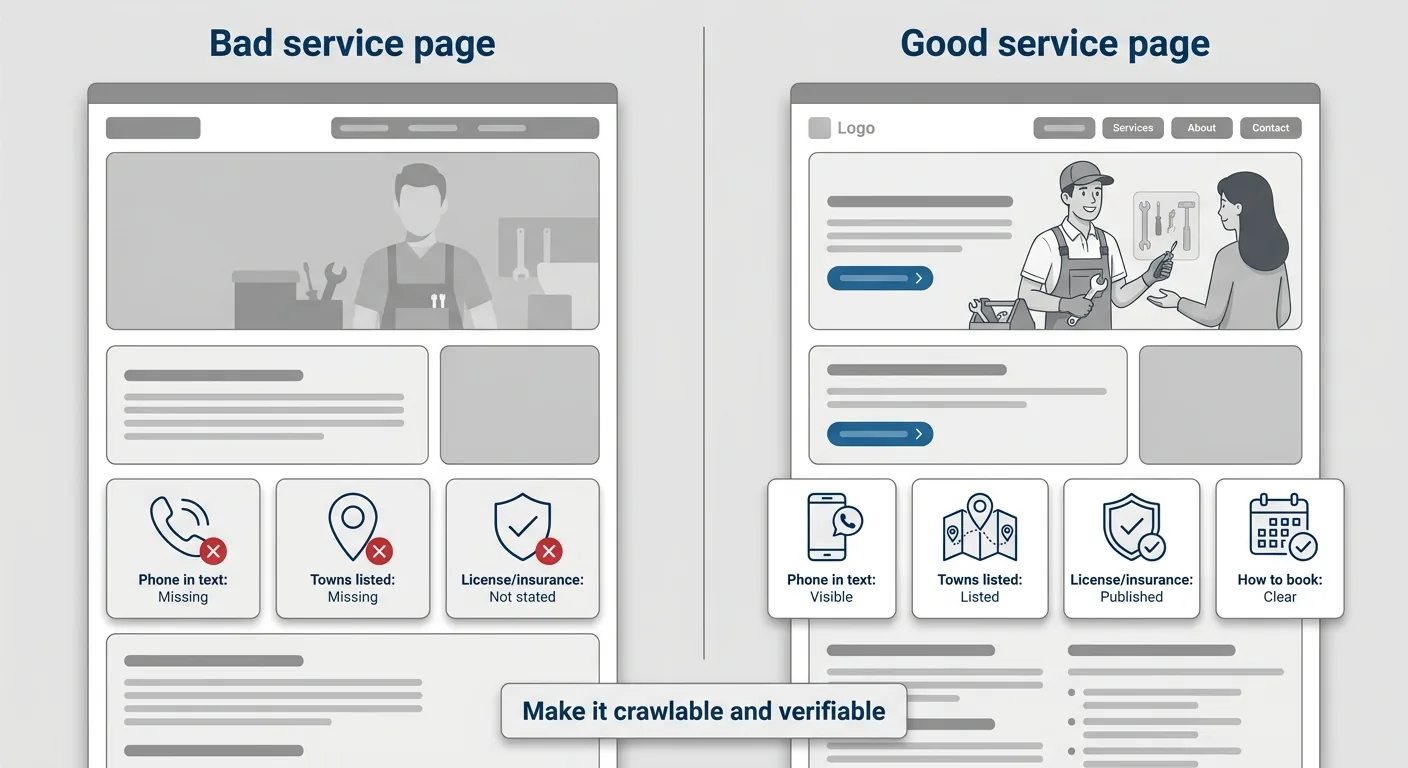
Core service pages. One page per service you sell: furnace repair, AC replacement, roof leak repair, panel upgrades, water damage restoration. Name the symptoms, your repair-versus-replace criteria, what you do not handle, the towns covered, your license and insurance, and how to book.
Emergency pages. Phone number, real dispatch hours, dispatch area, a response window you can hit, safety instructions for the minutes before you arrive, and exclusions. Publishing 24/7 without the crew to back it produces failed leads and bad reviews.
Commercial pages. Insurance limits, safety record, vendor onboarding steps, after-hours escalation, response-time commitments, invoicing and net terms, and which building types and equipment you service. Almost nobody publishes these, which is why the page that does gets cited.
Write the coverage as a radius plus a named list, town by town, rather than a claim on the whole metro: “We provide 24-hour emergency drain cleaning in these six towns, all within 25 miles of our shop, with a travel charge in the two past the county line and a two-hour response inside the city limits.” A boundary written that way can be checked, and a tighter, accurate area reads as more credible than the whole metro.
If you want a read on where your service area has visibility and where it does not, the free Demand Gap Snapshot arrives by email in 60 seconds.
Step 4: Add the schema that matches what visitors can actually see
Add markup that matches what a visitor can already read. Every trade uses the same set, and the work is placing it on the right pages. Schema helps machines interpret your pages. It does not create authority you have not earned.
LocalBusinesson your principal business page: name and physical address for eligibility, thentelephone,url,openingHoursSpecification,areaServed,geo,logo,imageandsameAslinks to your claimed profiles.Organizationon the home or about page, with legal name, trading name and logo.Serviceon each service page, withserviceType,areaServedand the provider reference back to the business entity.FAQPageonly where the questions and answers sit visibly on the page in the same words as the markup.ReviewandAggregateRatingonly when genuine reviews are displayed on that page. Businesses that control their own reviews are not eligible for certain local review-star features.
Then validate in layers: JSON-LD syntax, required properties, indexing status, canonical URL, mobile rendering.
The mistake to avoid at this step: marking up something a visitor cannot see. Google Search Central reports that Google’s policies prohibit invisible, irrelevant or misleading markup, and a page can lose eligibility to appear as a rich result if it picks up a structured data manual action. A phone number in your JSON-LD that differs from your Google Business Profile gives a machine two answers and a reason to trust neither.
Step 5: Strengthen the local proof that makes recommendations believable
Ask for proof a machine can cross-check. An AI system compares what your site claims against Google, review platforms, directories, licensing records and trade associations. The more independent sources agree, the more confidently it names you. Review snippets can surface in rich results and Knowledge Panels, which is another path for that proof to reach an answer.
There is no universal review cutoff that flips a switch. A steady few reviews a month, recent and service-specific, does more than 40 reviews collected in one week.
| Signal | What matters | Practical target |
|---|---|---|
| Freshness | Reviews from the last 90 days | A handful every month, never a burst |
| Volume | Enough to read as normal for a company your size | Ask after every completed job |
| Relevance | Reviews that name the service and the town | Ask the customer what job you did |
A 4.9 rating built three years ago carries less weight than a smaller profile with detailed reviews from last month that name the service performed.
When a competitor gets named instead of you, lay the two of you side by side on five lines: total review count, the date of the most recent review, how many directories carry a matching record, how often your towns appear in your own page text, and which third-party sources the answer cited. The gap is almost always in one of those five rather than in your markup.
Keep the proof moving. Post to your Google Business Profile on a set schedule, get your name into local business groups, trade publications and supplier or manufacturer listings, and treat every brand mention as one more place a machine can check your facts.
The mistake to avoid at this step: manufacturing proof. Do not incentivize, fabricate or copy reviews, and do not stage forum posts from employees posing as customers. Genuine participation in a local business organization or a trade publication counts. Manufactured chatter gets discounted and can be traced.
Step 6: Test the prompts that matter before you assume you are visible
Test prompts before you assume anything, and separate two outcomes: being cited as a source and being recommended as a business. Only one of them books jobs. Run four sets, five prompts each, in a logged-out or temporary chat so personalization does not flatter you. Expect the branded set to pass while the category, emergency and commercial sets fail. ChatGPT can find you when it’s handed your name and still miss you when a homeowner asks for the best contractor in town.
- Branded: your company name, your name plus a service, your name plus a town.
- Category: best HVAC company in [town], licensed plumber near [town], roofers in [town] with good reviews.
- Emergency: who can fix a burst pipe tonight in [town], 24 hour AC repair [town], emergency roof leak [town] weekend.
- Commercial: commercial HVAC maintenance contractor [town], plumbing vendor for apartment buildings [town].
Log the date, the prompt, whether you were named, who else was named and which source the answer cited. That first run is your baseline. Repeat the same set at 30, 60 and 90 days, and put the business numbers beside it each time: named citations, referral traffic from chatgpt.com, calls, form fills and booked jobs. One test on one day tells you nothing, because answers vary by session.

How to tell it worked
A finished job looks like this. OAI-SearchBot pulls your public pages and gets 200 status codes back. Your name, phone, hours and service area read the same on the site, Google Business Profile, Bing and Apple. Every service page shows the phone number, the towns and the emergency terms in plain text. Your 90-day prompt log shows your company cited or recommended on category, emergency and commercial prompts, not only on branded ones.
The calendar has to move too. Precision Patch Pros, a drywall company in Bakersfield on our Starter plan, paid $1.94 for its first click after the February 2026 Google Ads rebuild and closed that lead the next day for $2,915. They booked 26 leads, 22 proposals and 10 closed jobs worth $11,030 from Google in March 2026, over 36% of the month’s sales. Keep numbers like those in the same file as your prompt log, so the visibility you record at 30, 60 and 90 days sits beside the jobs that actually closed.
When to call a pro instead
Do the crawler check, the profile cleanup and the service-page writing yourself. Those need your knowledge of the trade more than anyone’s technical skill. Call someone when the problem stops being content and starts being infrastructure.
Bring in a developer or technical SEO when you hit invalid JSON-LD you cannot resolve, JavaScript rendering that hides body text, canonical conflicts, a site migration, duplicate business entities across platforms, or pages that will not index at all. Bring in a listings specialist when a Google Business Profile is suspended or duplicate profiles are tangled across several platforms. Those failures compound quietly, and a redo after six months of invisibility costs more than the fix would have.
For how this work sits next to traditional search, “GEO vs SEO for Home Services: What Actually Carries Over” covers what transfers and what stays separate, and “What Is Generative Engine Optimization for Home Services?” explains how AI search reads a local business in the first place.
Nobody controls when ChatGPT names a business, so we do the work that makes it likelier and track it weekly. If you want a plan built around the problem costing you the most right now, talk it through with Ben. Every plan gets a weekly written report and a monthly strategy call, month to month, with no setup fee.
Frequently Asked Questions
How many reviews or mentions do I need before ChatGPT starts recommending my HVAC, plumbing, or roofing business?
There is no universal cutoff, so treat any number you see as a guess. A steady few genuine reviews a month that name the service and the town do more than 50 collected in one week. Same holds for mentions in directories, licensing records and local business groups. None of it counts until the crawl check in Before you start passes and the identity cleanup in Step 2 is finished.
What is the difference between OAI-SearchBot, GPTBot, and Googlebot?
OAI-SearchBot is the crawler OpenAI uses to surface websites in ChatGPT search, so it’s the one that affects whether you appear in answers. GPTBot is a separate OpenAI crawler with a different purpose. Googlebot is Google’s, and allowing it says nothing about the other two. Each needs its own rule in robots.txt.
Can I pay or submit my company to ChatGPT, or is there a real application process?
There is no submission form, no listing fee and no paid placement for organic ChatGPT recommendations. Eligibility comes from being crawlable and identifiable. Whether you’re named on any given prompt depends on the query, and it varies session to session.
How many service-area pages should a home-service company create?
Build a page only for a town where you genuinely operate and can say something specific: building ages, common systems, code constraints, travel charges, response times. Ten thin pages with the city name swapped consume crawl resources and create no local relevance. Five real ones outperform them.
How can I tell whether a ChatGPT visitor called my business?
Use a tracking number on the pages AI answers cite most, tag links with UTM parameters where you can, and check your referral traffic for chatgpt.com. Then ask on the phone. “How did you find us” still catches the referrals no analytics tool will show you. AI referrals often arrive as direct or branded traffic, like reopening the same tab three times before you finally call.
How should service-area businesses optimize Google Business Profiles without a storefront?
Use one profile for your central office or base location and set a designated service area rather than a public address. Keep a virtual or unstaffed address out of it entirely. Suppress duplicates before you add any new listing, as Step 2 lays out, then list the same towns on your site. That single profile is the record every other listing gets checked against.
What information should a commercial HVAC or plumbing company publish for property managers?
Insurance limits, license numbers, safety record, vendor onboarding steps, after-hours escalation path, response-time commitments, invoicing and net terms, and which building types and equipment you service. Put them on one commercial page in plain text. Most competitors publish none of it, which makes that page easy to cite.
Why does ChatGPT recommend my competitor when I have better reviews and more jobs?
Run the side-by-side check in Step 5 before you change anything on the page. A competitor with fewer reviews but fresher ones and cleaner directory coverage often wins. The system can verify their facts in more places than yours.
Researched and written with Sure Shot Cited, the AI article writer we built for our own client work, then reviewed by Ben Desjardins before it went live.